CB QR Code: A WordPress.org Plugin for Shareable Page QR Codes
A small QR code plugin I took through WordPress.org review to learn the full release process, then audited and rebuilt a year later for version 1.0.1.
- Client
- Personal project
- Sector
- WordPress plugin
- Role
- Plugin development, WordPress.org review and release, refactoring and security fixes
- Timeline
- 2025 – 2026
The problem
Why I built it
I had written plenty of WordPress plugins for clients, but I had never put one through the official WordPress.org review. That process has a reputation: strict rules on security, naming, external calls and how code is shipped, checked by volunteers who read your code line by line.
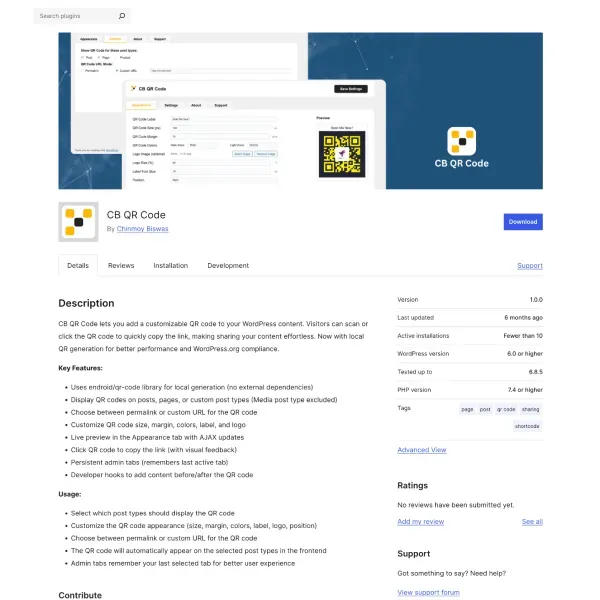
I wanted to learn it properly, on something small enough to finish. A QR code plugin was a good fit. The idea is simple: put a QR code on a post or page, so someone reading on a laptop can scan it and carry the page to their phone. Clicking the code copies the link.
Small, but not trivial. It needs settings, a live preview, front-end output, user input and file handling: all the places where plugins usually go wrong.
The first version
The first version, in July 2025, drew the QR codes the quick way: it sent the page address to an online QR service and showed the image that came back.
It worked, and it was the wrong choice. Every page view sent the visitor's URL to a third party. The site depended on someone else's server being up. And it ran straight into one of WordPress.org's clearest rules.
What the plugin had to do
- Generate codes on the site itself, with no outside service
- Let the owner choose which post types show a code, and use the permalink or a custom URL
- Customise size, margin, colours, label and logo, with a live preview
- Copy the link on click, with visible feedback
- Pass review, and stay safe with whatever an admin types into the settings
Approach
Passing review
The review came back on external calls. A plugin in the directory shouldn't send data to outside services without a very good reason, and drawing a QR code isn't one.
So I replaced the online service with endroid/qr-code, a well-known PHP library, bundled with the plugin through Composer. Codes are now generated on the server, so nothing about the page or the visitor leaves the site. I also removed support for loading the logo from an external URL. Logos now come from the site's own media library.
Around the review I tightened the rest too: sanitising every setting, escaping every output, handling form data properly and giving every function and option a unique prefix. I resubmitted in September, and CB QR Code went live on WordPress.org on 4 October 2025.
Coming back a year later
In October 2026 I audited the plugin with fresh eyes, the way I'd review someone else's code. It wasn't comfortable. The GitHub repository had drifted from the release on WordPress.org, and the code had grown in the usual way: admin and front end mixed together, defaults repeated in several places.
I started with paperwork rather than code:
- Aligned the repository with the exact 1.0.0 published on WordPress.org, so the history started from the truth.
- Wrote short feature specs for what the plugin should do, and a restructure plan.
- Raised the PHP minimum to 8.1, because that is what the bundled QR library actually requires. Claiming otherwise would only break sites.
Restructuring without breaking anyone
The restructure went in as three small pull requests rather than one big rewrite:
- A kernel: a small
boot,frameworkandappstructure, plus a test harness - Handlers, services and views: admin and front end split into clear parts
- Compatibility: a
boot/compat.phpfile that keeps every 1.0.0 function and option name working, so existing sites and any custom code that hooked into them keep working after the update
What the audit found
With the code easier to read, the bugs were easier to see. Version 1.0.1 fixed:
- Non-Latin links. Posts with non-Latin, percent-encoded permalinks produced QR codes that pointed to a broken address. For a plugin used anywhere in the world, that is a real bug.
- Codes in the wrong place. In a Query Loop or a related-posts list, the code was added to every post on the page instead of only the main one.
- A preview race. When the owner changed settings quickly, an older preview response could arrive late and overwrite a newer one.
- Escaping in the preview, where
&in a custom URL turned into&. - A label size that rendered as
12pxpxon new installs.
And two security fixes:
- Custom URLs must be http or https, so a setting can't be used to put a
javascript:link behind the code. - Every number is clamped to its allowed range (size, margin, logo size, font size), and the position can only be left or right.
Alongside those: the front-end CSS and JavaScript now load only where a code can appear, admin text is translatable, and deleting the plugin removes its settings instead of leaving them behind.
Results
- Listed on WordPress.org
- Oct 2025
- External services
- 0
- Fixes in 1.0.1
- 7
- Minimum PHP
- 8.1
- Approved and listed in the WordPress.org plugin directory in October 2025
- No external services: codes are generated on the site with endroid/qr-code
- Version 1.0.1, tested up to WordPress 7.1, with five bug fixes, two security fixes and three improvements
- Restructured without breaking changes, with a compatibility layer for every 1.0.0 name
- Open source on GitHub, with the full history from first commit to 1.0.1
What I learned
- The review is a good teacher. Most of what it asks for, such as no hidden external calls, prefixes, sanitising and escaping, is simply good practice. I now build client plugins to the same standard from the start.
- Do the easy thing last. Calling an online API was the quickest way to draw a QR code, and the one I had to undo.
- Audit your own old code. A year later, I found bugs I would have caught in someone else's work straight away. Writing specs first and refactoring in small, reviewable steps made the fixes safe to ship.