Sylhet Helpline: Local Directory with a Custom Block Theme and Listings Plugin
My own local directory for Sylhet, and the open-source listings plugin and block theme I built for it, which now power client sites too.
- Sector
- Local business directory
- Role
- Product idea, listings plugin, block theme, Gutenberg blocks, React admin and UX
- Timeline
- 2026 – now
The problem
The idea
Sylhet Helpline is my own project. It started with a simple frustration: in Sylhet, finding the phone number of a nearby pharmacy, a bank branch, a college office or a reliable transport service still depends on asking someone who knows. Information is scattered across Facebook pages, old posters and word of mouth, and much of it is out of date.
I wanted one place where anyone in the city can pick a category, see who is nearby, and tap Call.
Why not use an existing directory plugin?
I tried the usual WordPress directory plugins first. They can do almost anything, which was the problem:
- Heavy. Dozens of settings screens, templates and add-ons for features I would never use.
- Hard to restyle. Most ship their own front-end templates and CSS, so matching a clean block theme meant fighting the plugin.
- Not built for the block editor. Layouts lived in shortcodes and plugin settings, not in blocks I could arrange in the Site Editor.
A directory is not complicated at its core: a type of content, some categories, a few fields, search, and good cards. I decided it was worth building exactly that, and nothing more.
What the directory had to do
- Hold many kinds of listings. A bank, a salon and a restaurant need different details, but all share a name, category, area, phone number and status.
- Be quick to scan on a phone. Most people will use it on mobile, often in a hurry. They need to pick a category, spot a trustworthy listing and call.
- Show trust at a glance. Badges such as Verified, Premium, Popular and Open 24h, plus an open or closed label.
- Let businesses add themselves, without me typing every entry.
- Be editable without code, so layouts change in the Site Editor, not in templates.
Approach
Two pieces: a plugin for the data, a theme for the look
I split the project in two from the start:
cb-listing-anything, a plugin, owns the data: the listing content type, categories and tags, the custom fields, the REST API and the blocks.cb-listing-starter, a full-site editing block theme, owns the look: header, footer, templates and styles.
Keeping data out of the theme means the listings survive a redesign, and the plugin can power a completely different site. That decision turned out to matter more than I expected.
Ten blocks, not shortcodes
Everything a visitor sees is a Gutenberg block, written in JavaScript for the editor and rendered in PHP on the server:
- Listing search and a categories slider for the home page
- Listing cards slider and listings archive, with responsive column controls
- Listing card, with a choice of card designs
- Listing details, with a gallery lightbox
- Breadcrumb and related listings
- User dashboard, where a business manages its own listings
Because they are blocks, I can build a new page layout in the Site Editor in minutes, and so can anyone else who uses the theme.
Letting businesses add themselves
Typing hundreds of listings by hand doesn't scale, and the business owner is the person who knows their opening hours best. The user dashboard block gives businesses a front-end form to add and edit their listing, with photos and details.
Submissions don't go live straight away. Each one is reviewed first, because a directory is only useful if people can trust what it says. The Verified badge means something only if someone checked.
A React admin for the owner
The standard WordPress screens work, but they are slow for managing structured data. In March I rebuilt the plugin's admin as a React dashboard, with its own screens for listings, categories and tags, talking to the plugin's REST API.
At the same time I moved the PHP side onto a small MVC-style framework of controllers, models, providers and routes. It was a bigger change than any single feature, but it made each later feature quicker to add.
Ten categories and sample data
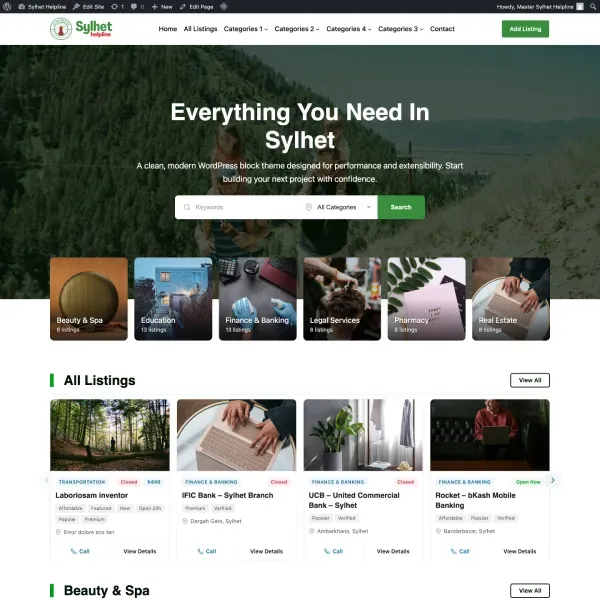
To design and test properly, I filled the staging site with 91 sample listings across ten categories: Beauty & Spa, Education, Finance & Banking, Legal Services, Pharmacy, Real Estate, Restaurant, Shopping, Technology and Transportation.
They are realistic but not real, and I am deliberately keeping them on staging. Launching a helpline with made-up phone numbers would defeat the whole point.
When a directory became a product catalogue
In March a client project came along: Cardinal Health Care, a medical device distributor that needed its first website quickly. Looking at what it needed, I realised a product catalogue is a directory with different labels: items, nested categories, detail pages and an enquiry button.
So the plugin grew. The commit history shows it: a subtitle field, a choice of card designs including a product card, a Product Inquiry button, responsive archive columns and a better breadcrumb all landed while that site was being built. Cardinal runs on the same plugin and theme, with a child theme for its brand, and it went from nothing to live in about ten days.
That is the real result of building Sylhet Helpline properly: the code I wrote for my own idea became the base for paid work.
Results
- Custom blocks
- 10
- Categories
- 10
- Sample listings
- 91
- Reused on
- Client sites
- A working directory on staging, with 10 categories, 91 sample listings, search and mobile-first listing cards
- An open-source listings plugin with 10 Gutenberg blocks, a React admin, a REST API and a front-end dashboard for businesses, public on GitHub
- A reusable block theme, with layouts that are edited in the Site Editor, not in code
- Business submissions with review, so listings can be trusted
- Reused for client work: the same plugin and theme power the Cardinal Health Care product catalogue
What's next
The public launch waits for real data. Before Sylhet Helpline goes live on its own domain, I am collecting verified details for local businesses, so that every number on the site is one you can actually call.
What I learned
Build the boring parts properly. Separating the data plugin from the theme, writing real blocks instead of shortcodes, and restructuring the code before it grew too big all felt slow for a personal project. They are exactly why the same code could be turned into a client's product catalogue in days.