CB Portfolio: A Vue.js WordPress Plugin for Resumes and Projects
A WordPress plugin with a Vue 3 admin and front end that ran my portfolio for a year, and taught me why server rendering matters for SEO.
- Client
- Personal project
- Sector
- Developer tools
- Role
- Plugin architecture, PHP and Vue.js development, data model and UX
- Timeline
- 2025 – 2026
The problem
Where it started
In October 2025 my portfolio was a regular WordPress theme. It did the job, but my experience, projects and skills were scattered through page-builder sections. Updating a job or adding a project meant editing layouts, not data.
I wanted three things at once:
- Portfolio data in one place, as structured records rather than page content.
- A modern developer portfolio look: a fixed left column with my name and navigation, a scrolling right column, smooth section navigation and a subtle mouse spotlight.
- A reason to learn Vue 3 and Vite properly inside WordPress, and ideally a plugin other developers could install too.
Why a plugin, and why Vue
Putting the portfolio in a plugin, not a theme, keeps the data independent of the design. Switch themes and your portfolio survives.
Vue answered the other two goals. The standard WordPress admin screens are slow for structured data: every save reloads the page, and reordering means fiddling with numbers. A single-page Vue admin could make editing feel instant. On the front end, Vue made the interactive parts, such as active-section highlighting while scrolling, the spotlight and the loader, straightforward to build.
That front-end decision turned out to be the most important one in the project, for reasons I didn't see coming.
Approach
Structure first
On the PHP side I used an MVC-style structure with namespaces and Composer autoloading: models for each kind of data, controllers for the REST API, and templates for output. Portfolio data lives in custom database tables rather than post meta, because experience entries and projects are structured records with their own fields and ordering.
The plugin exposes everything through the WordPress REST API, and both Vue apps, the admin and the front end, talk to it. Vite builds the assets.
A single-page admin
The admin dashboard is a Vue 3 app inside WordPress, with screens for profile information, experience and projects:
- Instant saving through the REST API, without page reloads
- Reordering for experience and projects, so the order on the site is the order you choose
- Project details with descriptions, technologies and links
- JSON import and export, to back up the whole portfolio or move it to another site
The first working build, with the admin and the front end, took about two weeks, from 23 October to 9 November 2025.
The front end
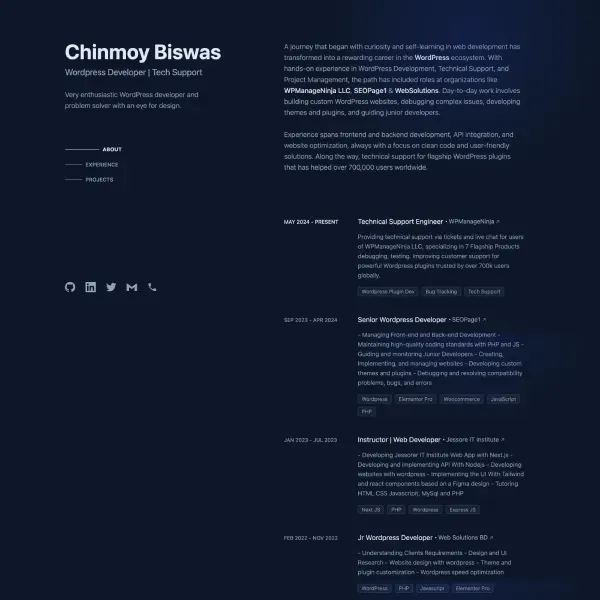
The public page is a two-column layout: a fixed left sidebar with name, role, intro, section navigation and social links, and a scrolling right column for About, Experience and Projects. On desktop a soft spotlight follows the mouse. The active section in the navigation updates as you scroll.
It looked the way I wanted. In December I added a projects archive, and the plugin ran my portfolio site for about a year.
The SEO problem I didn't see
In mid-November I fixed the SEO basics: proper page titles, meta descriptions and favicons. I assumed that was enough.
It wasn't. Because the front end was a Vue app, the page that the server sent was mostly an empty container, and the actual content (my experience, my projects, the words people might search for) was drawn by JavaScript in the browser.
Google can run JavaScript, but it does so later, less reliably and with less priority than plain HTML. And the projects didn't have their own server-rendered pages with their own addresses, so there was little for Google to find.
The Search Console report told the story plainly: Google had indexed exactly one page of my site, the home page. Searching my own name didn't bring up my portfolio.
What it led to
That was the main reason I rebuilt the site as Portfolio v4, a server-rendered Laravel app where every project and post is a real page with its own URL, title, structured data and a place in the sitemap.
The plugin's work wasn't wasted. The content model of profile, experience and projects carried straight over. And the JSON export I had built as a backup feature became the import file for the new site: all my experience entries and projects moved across in one step, without retyping anything.
Results
- Version
- 1.0.2
- First working build
- ~2 weeks
- Commits
- 29
- Pages Google indexed
- 1
- A working WordPress portfolio plugin, version 1.0.2, open source on GitHub
- A Vue 3 single-page admin with instant saving, reordering and JSON import/export
- A two-column interactive front end with section navigation, a spotlight effect and a projects archive
- Ran my own portfolio site from late 2025 until the move to Laravel in November 2026
- Its JSON export became the migration path into the new site
What I learned
- Learn the tool, but know its cost. Building with Vue inside WordPress taught me a lot about REST APIs, build tooling and admin UX. For a site that has to be found on Google, though, the content must arrive as HTML from the server.
- Measure, don't assume. Fixing titles and meta tags felt like "doing SEO". One look at the Search Console indexing report showed the real problem.
- Export features pay off. I built import/export as a safety net. It turned into the easiest part of the migration.